To install xsl:easy for Eclipse perform the following steps:
- In Eclipse (3.5.2 or higher), select menu Help > Install New Software.
An overview of update sites for Eclipse plug-ins will be displayed. - Define the xsl:easy update site:
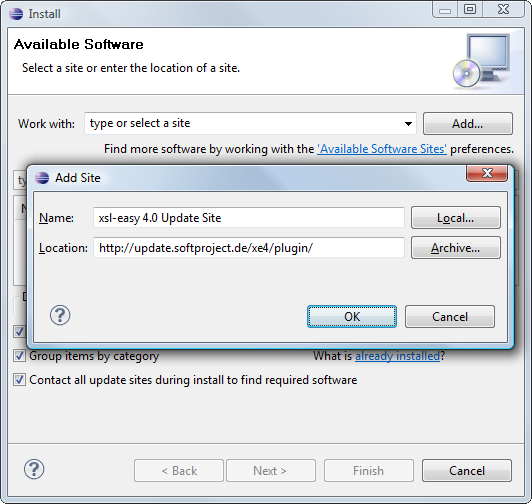
- Click Add to add a new update site.
- In Name, enter a name for the update site,
e.g. xsl-easy 4.0 Update Site - In Location, enter the update site URL:
http://update.softproject.de/xe4/plugin/. - Click OK to register the update site.
In the list of update sites, the newly created entry will be available.
- Activate the checkbox previous to xsl:easy for Eclipse, and click Next.
The next page with the plug-ins to be installed will be displayed. - Accept the licence agreements.
- Click Finish to retrieve and install all required files.
- If a security warning concerning unsigned contents occurs, confirm with OK.
- Restart the Eclipse IDE.
When you first use xsl:easy, the Registration wizard will pop up. You may either request a 21 day trial license (which you will receive via e-mail) or enter the full license. You can buy the full license in our online shop.